Exporting Metadata
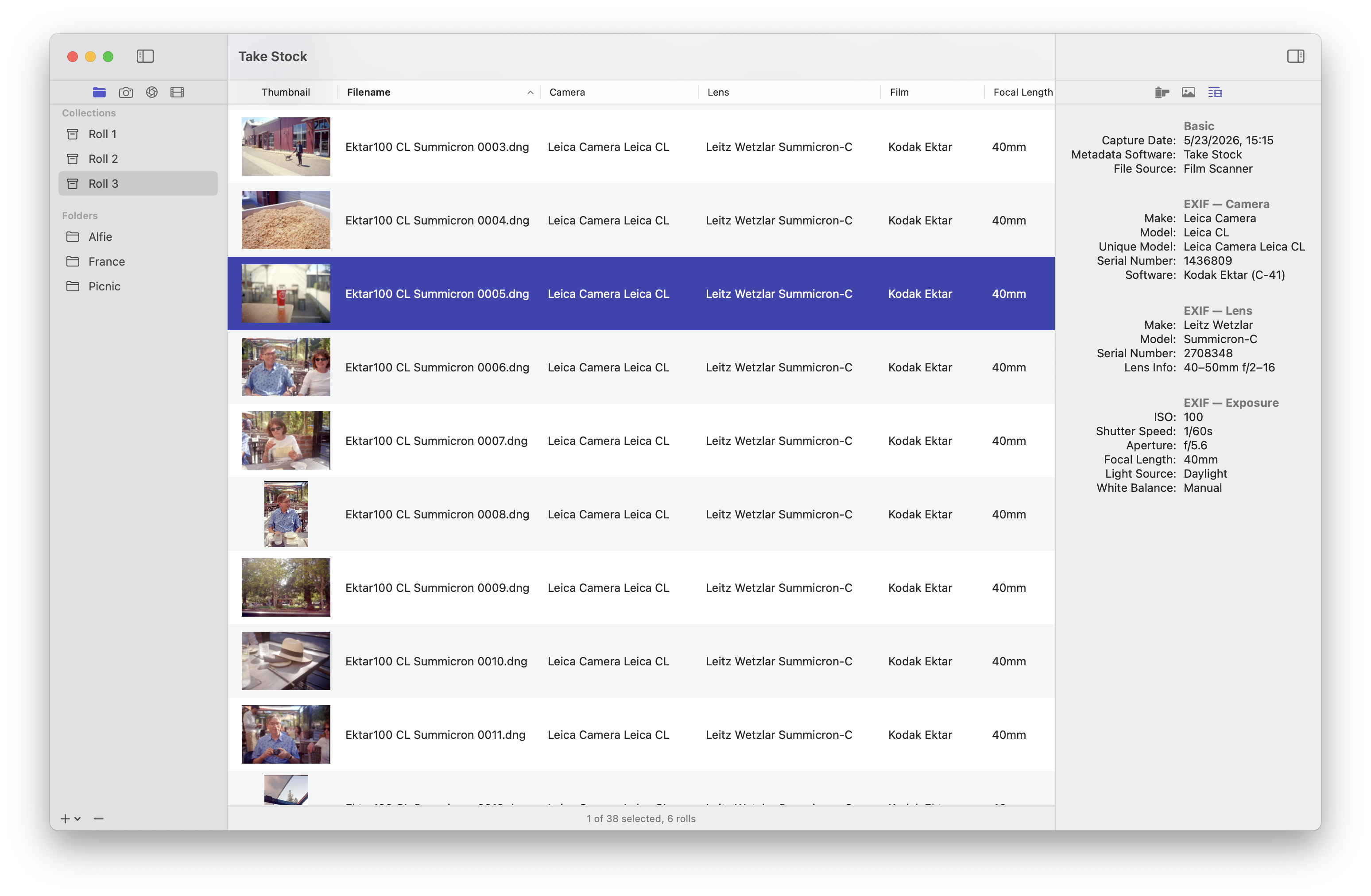
The general metadata for a photo is visible in the table, but the final metadata which will be written can be previewed from the Metadata Inspector. Here the metadata is organized into sections and the exact values are shown. If a metadata field doesn't have any information to be written a — is displayed.
When all of the metadata has been chosen it can be written to all photos in the roll from Film Roll > Write Metadata. A progress indicator is displayed in the Film Roll tab.
Notes on Working with Raw Files
The most common format for film scans is a TIFF and Take Stock was designed with this in mind, but it works perfectly well with raw formats. Some film scanners/scanning software can save scans as DNGs and digitizing photos with a camera is another popular option.
Altering the metadata in raw files, specifically the make and model, can cause some software to not recognize the raw format even though the image data itself is perfectly fine. If your camera has an option to save files as TIFFs that may be preferable.
Another very specific quirk of metadata involves DNGs, Capture One, and photos shot on a Hasselblad 501CM. Due to the long history between Phase One and Hasselblad Capture One will refuse to read valid DNGs in which the make has been set to "Hasselblad".